Quick answer: Anchor texts are the clickable words in a link. Search engines and users rely on them to understand what the linked page is about. Write anchor texts that are relevant, descriptive, varied, and natural—avoid repetitive exact-match keywords.
Used well, anchor texts help readers decide whether to click and help search engines understand how pages relate. Used poorly, they can confuse users or trigger spam signals. This guide explains what anchor texts are, why they matter for SEO, the main types with examples, and how to write and audit them without over-optimizing.
What are anchor texts?
Anchor texts are the visible, clickable words in a hyperlink. In HTML, they're the text between the opening and closing <a> tags. Example: <a href="https://example.com">best hiking boots</a>. The phrase “best hiking boots” is the anchor text.
Good anchor texts tell users and crawlers what to expect on the destination page. They should match the context of the sentence, be concise yet descriptive, and avoid misleading wording.
Why anchor texts matter for SEO
Anchor texts influence both user experience and how search engines interpret links:
Relevance and context: Descriptive anchors act as labels, signaling the topic of the target page and how it relates to the surrounding content.
Information architecture: Consistent, helpful anchors clarify the relationships among pages, making it easier for crawlers to understand your site's structure.
Click-through behavior: Clear wording sets expectations and encourages the right clicks from the right readers, lowering bounce risk.
Accessibility: Screen readers often read link text out of context. Meaningful anchors aid navigation for all users.
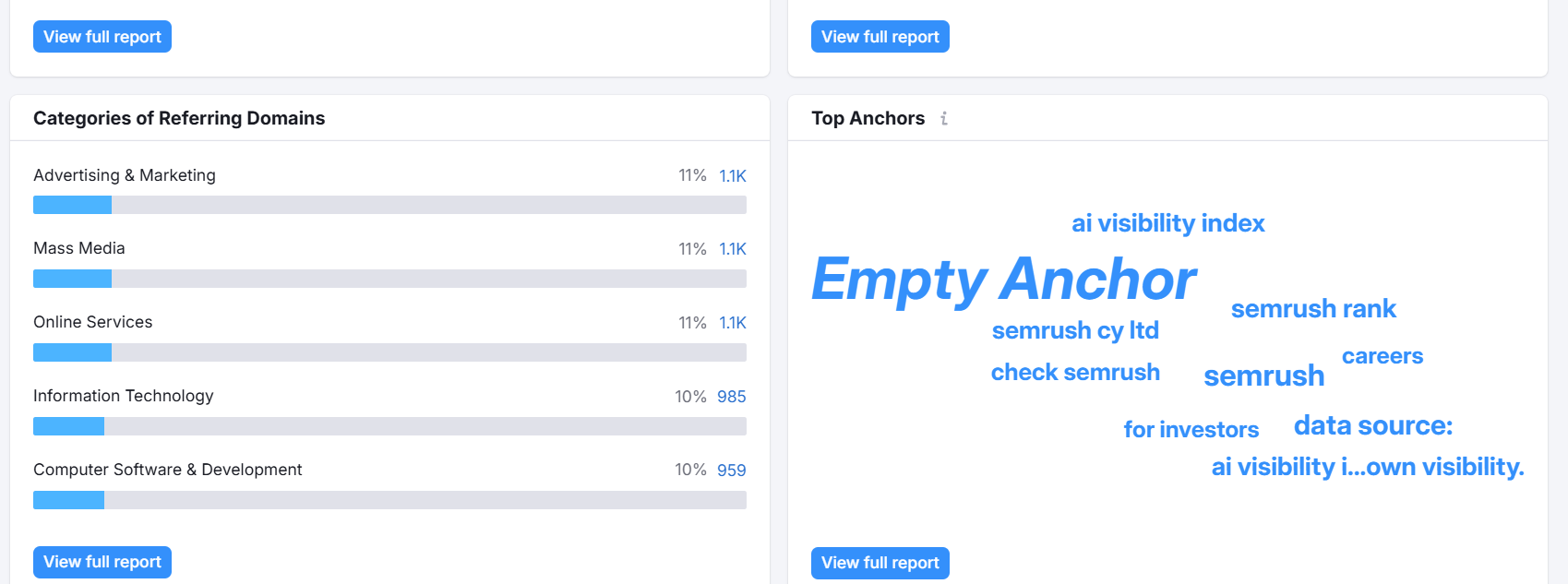
Spam and trust signals: Over-optimized, repetitive exact-match anchors can look manipulative. Natural, varied anchors are safer and more durable.
Types of anchor texts (with examples)
Mixing anchor text types creates a natural profile. Here are the most common categories, with guidance on when to use each.
Exact-match anchor text
What it is: The anchor matches a core keyword exactly.
Example: Linking to a running shoe guide with <a href="https://example.com/running-shoes">running shoes</a>.
Use it when: The context is highly relevant and the destination is unquestionably about that term.
Caution: Repeating exact-match anchors across many links can look unnatural. Keep usage limited and balanced with variations.
Partial-match (or phrase-match) anchor text
What it is: Includes the keyword plus modifiers or a longer phrase.
Example: <a href="https://example.com/running-shoes">best running shoes for flat feet</a>.
Why it's good: More natural in sentences and less likely to trigger over-optimization signals while still providing clear relevance.
Branded anchor text
What it is: Uses a brand name as the anchor.
Example: <a href="https://example.com">Acme Gear</a>.
Use it when: Citing sources, referencing companies, or linking to a brand's homepage or brand-specific content.
Brand + keyword (compound) anchor text
What it is: Combines the brand with a relevant keyword.
Example: <a href="https://example.com/running-shoes">Acme running shoes</a>.
Benefit: Signals both entity (brand) and topic (keyword), often natural in reviews and comparisons.
Generic anchor text
What it is: Non-descriptive phrases like '"click here,” '"learn more,” or '"this article.”
Example: <a href="https://example.com/guide">learn more</a>.
When acceptable: Buttons and CTAs where context is immediately adjacent and obvious.
Caution: Avoid using generic anchors for important informational links—prefer descriptive wording.
Naked URL (URL as anchor)
What it is: The link text is the raw URL.
Example: <a href="https://example.com/running-shoes">https://example.com/running-shoes</a>.
Use sparingly: It's less user-friendly and less descriptive; better suited to citations or when brand/URL visibility is required.
Natural language (sentence) anchors
What it is: The anchor is part of a full natural sentence or question.
Example: See our <a href="https://example.com/running-shoes">guide to choosing running shoes</a> for your gait.
Benefit: Highly readable and context-rich, ideal for on-page usability and diverse phrasing.
Navigational anchors
What it is: Anchors that help users move around a site, like '"About us,” '"Pricing,” or breadcrumbs.
Example: <a href="https://example.com/pricing">Pricing</a>.
Note: These are expected and fine, but they don't describe deeper content topics.
Image anchors (via alt text)
What it is: When an image is a link, the alt attribute serves as the anchor text.
Best practice: Write alt text that briefly describes the link destination, not just the image's appearance, unless the image itself is the subject.
Internal vs. external anchor texts
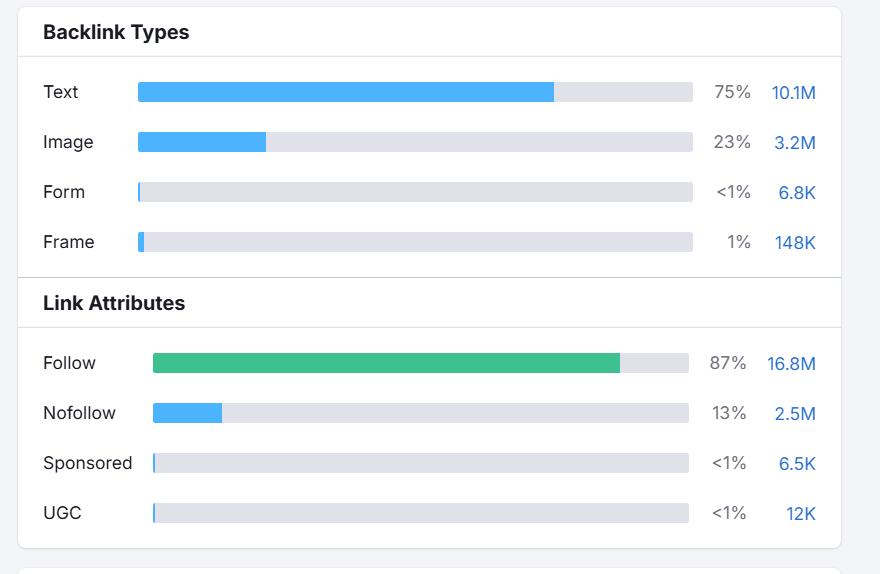
Internal links connect pages within your site. Their anchors should reflect your content hierarchy and help distribute relevance to key pages. Keep a consistent but varied pattern so important pages receive descriptive anchors from different contexts.
External links point to other sites. Use them to cite sources, credit data, or suggest further reading. Ensure anchors are fair and descriptive, avoid keyword-heavy phrasing that could look manipulative, and link only to reputable pages that match the promise of your anchor text.
Best practices for using anchor texts
Write for people first: If a human can't guess the destination from the anchor alone, rewrite it.
Keep it descriptive and concise: 2–6 words often work well, but clarity beats brevity. Don't cram multiple keywords.
Match the destination precisely: Don't promise a '"pricing guide” and link to a generic landing page. Misalignment causes pogo-sticking.
Vary your phrasing naturally: Mix exact, partial, branded, and natural-language anchors to avoid a repetitive profile.
Prioritize relevance: The surrounding sentence should support the link. Place links near the related statement, not crammed into intros or conclusions.
Avoid over-optimization: Too many exact-match anchors—especially from external links—can look manipulative. Balance with branded and natural variations.
Use meaningful CTA anchors: Replace '"click here” with '"download the template,” '"compare plans,” or '"see sizing chart.”
Optimize image links: Use accurate alt text when images function as links ('"women's trail shoes size guide”).
Mind accessibility: Make anchors self-explanatory out of context; screen readers often present links in a list.
Limit link clutter: Too many links in a short paragraph dilute attention. Link the first, most helpful mention.
Audit regularly: Check distribution of anchor types, fix misleading wording, and ensure key pages receive diverse, relevant anchors.
How to write better anchor texts (step by step)
Use this repeatable workflow to craft anchors that help readers and search engines.
1) Identify the link's purpose and the target page
Decide what the reader should learn or do after clicking. Is it to verify a claim, explore a how-to, compare products, or convert? The purpose guides your phrasing.
2) Map the anchor to the surrounding sentence
Write the sentence first, then choose the 2–6 words that capture the promise of the destination. If none fit cleanly, rewrite the sentence.
3) Draft 3–5 variations
Create several anchors—from partial match to branded—to use across your site or over time. Example variations for a running shoe guide: '"running shoe guide,” '"choose running shoes,” '"Acme running shoes tips,” '"how to pick running shoes.”
4) Check for conflicts and cannibalization
Make sure the anchor you plan to use isn't already used widely for a different page. Each important page should have a core theme reflected by its incoming anchors.
5) Place links where they help the reader decide
Insert links where curiosity peaks—after a claim, before a step-by-step, or near a recommendation—so the anchor carries maximum context and intent.
6) QA for clarity and accessibility
Read the paragraph without the link's surrounding context. Would the anchor alone still make sense? Avoid generic phrases unless they accompany buttons or are visually labeled.
7) Track performance and iterate
Monitor click-through, bounce behavior, and conversions on linked paths. Test small wording changes to see if readers better understand the promise behind your link.
How to audit anchor texts on your site
An anchor text audit helps you spot over-optimization, thin anchors, and missed opportunities for internal linking. Here's a straightforward process:
Collect link data: Export internal links and anchor texts using your CMS reports and a crawler. Include source URL, destination URL, anchor text, and placement (navigation, body, footer).
Classify anchor types: Tag anchors as exact, partial, branded, brand + keyword, generic, naked URL, or image (alt text). A simple spreadsheet works.
Analyze distribution: Look at each key page and ask: Do incoming anchors describe its topic? Is one exact phrase repeated excessively?
Find mismatches: Flag anchors whose wording doesn't match the destination's content. Correct or update the destination to match the promise.
Locate link gaps: Identify pages that should link to cornerstone content but don't. Add contextual internal links with descriptive anchors.
Fix generic anchors: Replace '"learn more” and '"click here” where possible with descriptive alternatives that preserve the sentence's flow.
Tidy navigation and templates: Ensure sitewide elements (like footers) aren't spreading exact-match or overly promotional anchors across every page.
Review image alt text: Ensure image links have meaningful alt text that describes the destination page, not just the image.
Re-audit periodically: Recheck quarterly or after major content launches to keep anchors aligned with your current content strategy.
Common anchor text mistakes to avoid
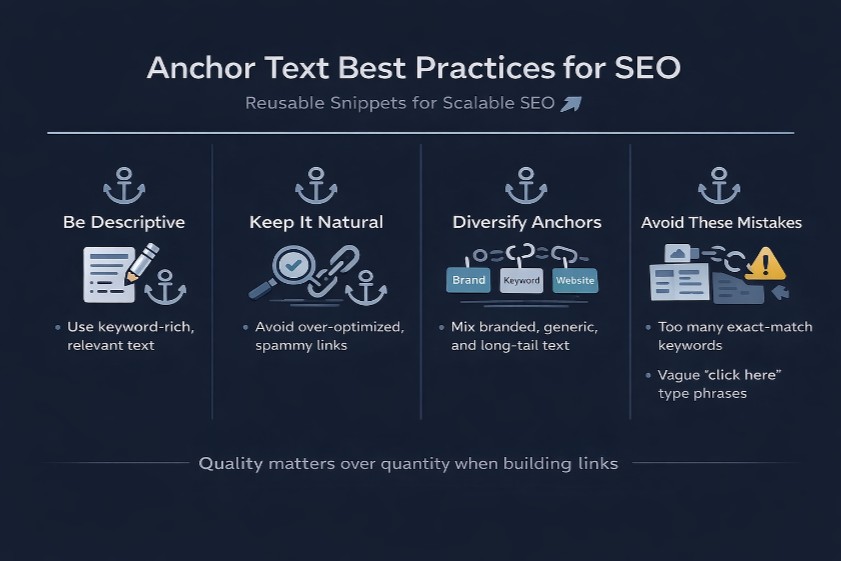
Overusing exact-match keywords: Repetition across many links can look manipulative. Balance with branded and natural-language anchors.
Misleading anchors: Anchors that don't match the destination erode trust and inflate bounce rates.
Stuffing multiple keywords: '"running shoes trail marathon best budget” reads poorly and signals low quality. Clarity over keyword density.
Generic anchors for important links: Don't hide critical content behind '"click here.” Say what it is: '"download the fitting chart.”
Sitewide exact-match links: Footer or sidebar links with the same keyword-rich anchor on every page can look spammy and distract crawlers.
Linking every brand mention: Over-linking is noisy and dilutes attention. Link the first prominent mention that adds value.
Using naked URLs in body copy: They look messy and say little. Prefer descriptive words unless a citation requires the visible URL.
Ignoring image alt for linked images: Without alt text, the link is functionally unlabeled for assistive tech and crawlers.
One anchor pointing to multiple topics: If '"setup guide” sometimes points to support and sometimes to marketing pages, readers get confused. Standardize.
Examples by scenario
Use these '"good vs. better” examples to sharpen your instinct for clear, user-centered anchors.
Ecommerce product page
Context: A blog post discussing trail running shoes links to a product category.
Good:
See our <a href="https://example.com/trail-running-shoes">trail running shoes</a>.(Descriptive and relevant.)Better:
Compare <a href="https://example.com/trail-running-shoes">women's trail running shoes</a> by grip and weight.(Adds specificity that matches the page content.)
How-to blog post
Context: Linking to a step-by-step lacing guide.
Good:
Try this <a href="https://example.com/heel-lock-lacing">heel-lock lacing technique</a>.Better:
Use the <a href="https://example.com/heel-lock-lacing">heel-lock lacing method</a> to reduce heel slip on long runs.(Describes benefit.)
SaaS pricing and features
Context: A features page links to pricing.
Good:
See <a href="https://example.com/pricing">pricing</a>.Better:
Compare <a href="https://example.com/pricing">plans and usage limits</a>.(Clarifies what users will learn.)
Local business
Context: A service page links to booking.
Good:
<a href="https://example.com/appointments">Book an appointment</a>.Better:
<a href="https://example.com/appointments">Book a same‑day HVAC inspection</a>.(Adds service detail and urgency.)
Key takeaways and next steps
Be descriptive: Anchor texts should match the destination and the reader's intent.
Stay natural: Mix exact, partial, branded, and sentence-style anchors to avoid repetition.
Place with purpose: Add links where they help decisions, not to meet a quota.
Audit regularly: Fix generic or misleading anchors and strengthen links to cornerstone pages.
Used thoughtfully, anchor texts make your content easier to navigate, more accessible, and easier for search engines to interpret. Start by auditing a few key pages today, rewrite unclear anchors, and roll the best practices across your site.
FAQs
What is an anchor text in SEO?
It's the clickable text of a hyperlink. Clear anchor texts tell users and search engines what to expect on the destination page, improving relevance and usability.
How long should an anchor text be?
Use the shortest wording that still describes the destination—often 2–6 words. Longer is fine if it improves clarity. Avoid packing multiple keywords.
Do anchor texts still matter today?
Yes. While search engines consider many signals, descriptive anchors remain important for context, user experience, and understanding site structure.
Can I use the same anchor text for multiple pages?
Only if those pages satisfy the same intent. Otherwise, standardize distinct anchors for distinct topics to avoid confusing users and splitting relevance.
How many links per page is too many?
There's no fixed number. Prioritize usefulness: link the most helpful mentions and avoid clusters of links that compete for attention in the same paragraph.