
This SEO glossary gives you plain‑English definitions of the search terms you’ll see in audits, briefs, and analytics. It’s written for US readers and updated for today’s search—covering on‑page SEO, technical SEO, content, links, analytics, Core Web Vitals, schema, local SEO, and AI Overviews. Bookmark it, and use the navigation to jump to what you need.
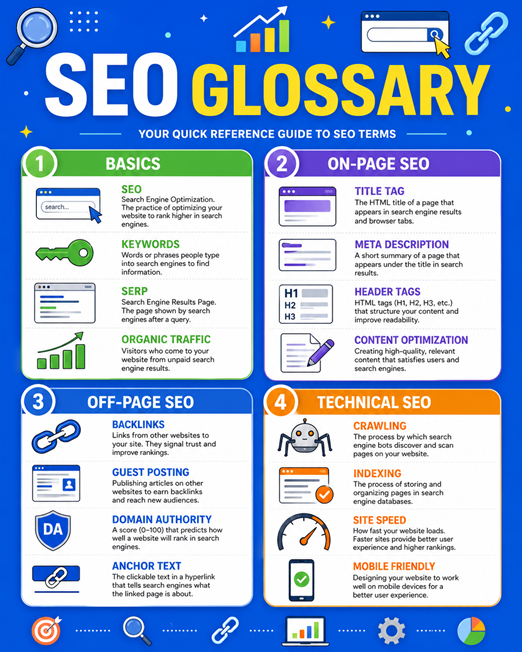
Quick definitions: 20 must‑know SEO terms
Start here for fast context. Each term below appears throughout this SEO glossary.
SEO (Search Engine Optimization): Improving a site so it earns more relevant, unpaid (organic) traffic from search engines.
Organic search: Non‑paid listings on a search results page.
SERP: The search engine results page returned for a query.
Query intent (search intent): What the searcher wants—learn, compare, do, or buy.
Ranking factor: A signal search engines use to order results (e.g., relevance, quality, speed).
Title tag: The page title shown in SERPs and the browser tab.
Meta description: A summary that may appear under the title in SERPs.
Internal link: A link from one page on your site to another.
Backlink: A link from another site to yours.
Anchor text: The clickable text of a link.
Canonical tag: A hint telling search engines which page is the primary version among duplicates.
Robots.txt: A file that guides crawler access to parts of your site.
XML sitemap: A machine‑readable list of URLs to help discovery and indexing.
Core Web Vitals: User‑centric speed and stability metrics (LCP, INP, CLS).
Schema (structured data): Code that helps search engines understand page meaning and eligibility for rich results.
Featured snippet: A highlighted answer box extracted from a page.
People Also Ask (PAA): A list of related questions and answers in SERPs.
E‑E‑A‑T: Experience, Expertise, Authoritativeness, and Trustworthiness—quality concepts used by search raters and reflected in systems.
Manual action: A human‑reviewed penalty for violating spam policies.
AI Overviews: AI‑generated summaries that can appear for some queries, drawing from multiple sources.
Fundamentals & Algorithms
These concepts ground how search works. Understanding them helps you diagnose issues and prioritize SEO work that moves the needle.
Search engine: Software that crawls the web, indexes pages, and ranks results for queries (e.g., Google, Bing).
Algorithm: The set of systems that evaluate pages and order results for each query.
Ranking factor: A signal used by algorithms to assess relevance and quality; factors work in combination, not isolation.
Relevance: How well a page matches the words, meaning, and intent behind a query.
Freshness: How recently content was published/updated when recency matters to the query.
E‑E‑A‑T: Experience, Expertise, Authoritativeness, and Trustworthiness—ways content demonstrates credibility; not a single score.
YMYL: "Your Money or Your Life" topics (health, finance, safety, etc.) held to higher quality standards.
Query intent: Informational, navigational, commercial investigation, or transactional—align content to win.
Personalization & context: Results can vary by location, device, language, and search history.
Core updates: Broad changes to ranking systems intended to improve overall result quality.
Spam updates: System updates targeting policy violations (e.g., link schemes, site reputation abuse).
Page experience: A collection of signals (e.g., Core Web Vitals, mobile‑friendliness) that reflect usability.
Tip: Don’t optimize for "algorithms." Optimize for users: clear intent match, helpful content, and fast, stable pages.
On‑Page SEO
On‑page SEO covers elements you control on the page itself. Good on‑page work helps search engines understand the topic, and it helps users find and engage with your content.
Title tag: The page’s headline in SERPs; keep it concise, place the core keyword naturally, and make it clickable.
Meta description: A short summary that can influence clicks; describe value clearly and match intent.
H1–H6 headings: Structural headings that outline page topics; use one H1 and descriptive subheads.
URL slug: The readable portion of a URL (e.g., /seo‑glossary); keep it short and descriptive.
Keyword: The words/phrases a page targets; use naturally—avoid stuffing.
Keyword stuffing: Overusing keywords in ways that hurt readability; can reduce quality and trust.
Keyword cannibalization: Multiple pages competing for the same intent; consolidate or differentiate.
Internal linking: Linking to related pages to help users and crawlers discover and understand your site.
Anchor text: The clickable text of a link; write descriptive, natural anchors.
Image alt text: A text alternative for images that aids accessibility and image search understanding.
Thin content: Pages with little value for their intent (too short, generic, or unhelpful); enrich or remove.
Duplicate content: Substantially similar pages; use canonical tags and consolidate where appropriate.
Content hub/pillar page: A central page that links to focused subpages to build topical coverage.
Readability: Clear structure, short sentences, and scannable formatting that improves comprehension.
Technical SEO
Technical SEO focuses on how search engines access, render, and interpret your site. It reduces friction for crawlers and ensures the right versions of pages are served.
Robots.txt: A file at your root that tells crawlers which paths they can or shouldn’t request. Example:
User-agent: *
Disallow: /cart/
Allow: /
Meta robots tag: Per‑page directives like
<meta name="robots" content="index,follow"/>to control indexing and following.Canonical tag: A hint that designates the preferred URL for duplicate or similar pages:
<link rel="canonical" href="https://www.example.com/preferred-url/"/>XML sitemap: A feed of important URLs for discovery. Keep it clean (200‑level pages only).
HTTP status codes: Server responses—200 (OK), 301 (permanent redirect), 302 (temporary), 404 (not found), 410 (gone), 500 (server error).
Pagination: Organized sequences of content (e.g., pages 1, 2, 3). UX clarity matters; rel
next/prevare no longer used as indexing signals by Google but still fine for navigation.Faceted navigation: Filters that create many URL combinations; manage with canonicalization and parameter controls.
Parameter handling: Query parameters (e.g., ?color=blue) that can create duplicates; prefer clean URLs for indexable content.
JavaScript SEO: Ensuring content rendered via JS is discoverable and indexable; prefer SSR or hydration for critical content.
Dynamic rendering / SSR: Strategies to deliver HTML content that can be crawled reliably; SSR often helps performance and indexing.
Mobile‑first indexing: Google primarily uses mobile content for indexing and ranking; ensure parity between desktop and mobile.
CDN: Content delivery networks cache assets closer to users for faster load times.
Content & SERP Features
Great content aligns with intent and clarifies meaning for search engines. SERP features present your content in enhanced ways when eligible.
Featured snippet: A prominent answer pulled from a page; concise, structured answers increase eligibility.
People Also Ask (PAA): Expandable question boxes; writing Q&A‑style subheads can improve visibility.
Rich results: Enhanced listings that show additional data (e.g., ratings, prices) when structured data is present and eligible.
Knowledge panel: An information panel about a known entity, often sourced from the knowledge graph and trusted data sources.
Top stories: News‑oriented carousel reserved for eligible publishers.
Video results: Appear when video is a good fit for the query; use video structured data and timestamps where helpful.
FAQ rich result: An expandable FAQ under a listing; eligibility has been limited for many sites.
How‑to rich result: Step‑by‑step instructions; eligibility and display may vary by platform and updates.
Topical authority: Depth and consistency of coverage around a subject area across your site.
Content freshness: Updates that keep evergreen content current when intent demands.
Pillar & cluster strategy: A central pillar page supported by clusters of detailed posts to build coverage and internal links.
Off‑Page & Link Building
Off‑page signals—especially links—help search engines assess authority and discover your pages. Focus on earning links through quality and relevance.
Backlink: A link from another site to yours; quality and context matter more than count alone.
PageRank (link equity): A model of how link signals propagate through the web; internal links distribute equity on your site.
Rel attributes:
nofollow(don’t pass endorsement),sponsored(paid links),ugc(user‑generated content). They’re treated as hints.Link building: Earning relevant mentions and links through content, partnerships, and digital PR.
Digital PR: Newsworthy content and outreach that earns authoritative coverage and links.
Anchor text distribution: A natural mix of branded, generic, and descriptive anchors reduces risk.
Link velocity: The pace at which links are acquired; sudden unnatural spikes can look suspicious.
Disavow: A way to ask Google to ignore certain links; reserved for clear cases of problematic link acquisition.
PBN (private blog network): A network of sites used to manipulate rankings; violates spam policies.
Toxic links: Links from spammy or irrelevant pages; best addressed by avoidance and quality acquisition.
Outreach: Targeted pitches to relevant sites or journalists to earn coverage and links.
Analytics & Measurement
Measurement translates SEO work into business impact. Use Search Console for search diagnostics and GA4 (or similar) for on‑site behavior and conversions.
Google Search Console (GSC): Free tool to monitor indexing, performance, and issues in Google Search.
Impressions: How often your pages appeared in search results for queries.
Clicks: The number of times searchers clicked your result.
CTR (click‑through rate): Clicks divided by impressions; influenced by title, description, and SERP features.
Average position: The mean top position of your URL for queries; directional, not a precise rank at all times.
GA4: Google Analytics 4; event‑based analytics focused on engagement rather than sessions alone.
Engagement rate: Percentage of sessions that meet engagement criteria (e.g., active time, conversions).
Average engagement time: How long users actively interact with your site.
Conversion: A desired action (purchase, lead, signup) attributed to visits from organic search.
Attribution model: Rules for assigning credit to touchpoints (e.g., data‑driven, last click).
A/B testing: Comparing variants to improve engagement or conversion metrics without harming crawlability.
Thresholding: Privacy‑preserving limits that can hide small user counts in GA4 reports.
Sampling: Using a subset of data to estimate results; can affect report precision.
KPI (key performance indicator): A metric tied to business goals (e.g., leads from organic search).
Local & International SEO
Location and language often drive intent. Local SEO focuses on proximity and business details; international SEO aligns content and signals to language/region.
Google Business Profile (GBP): Your business listing for Google Maps and local search.
Local pack: A map‑based set of nearby businesses displayed for local queries.
NAP consistency: Name, address, phone number consistency across the web to reinforce trust.
Local citations: Mentions of NAP details on directories and relevant sites.
Reviews: User ratings and comments; respond and encourage authentic feedback.
Proximity: How close a business is to the searcher’s location; affects local rankings.
Service area business (SAB): Businesses that visit customers; configure service areas in GBP.
Local landing page: A page tailored to a city/region and service offering with unique value.
International SEO: Adapting content, structure, and signals to target countries/languages.
Hreflang: Annotations indicating language/region variants to help the right page show:
<link rel="alternate" href="https://example.com/en-us/" hreflang="en-us"/>ccTLD/subdomain/subfolder: Structures for international sites (e.g., .fr, fr.example.com, /fr/) with trade‑offs in maintenance and signal consolidation.
Language targeting: Use on‑page language, localization, and hreflang to serve the right audience.
Crawling, Indexing & Files
Crawling discovers pages; rendering processes content; indexing stores it for retrieval. Your job is to make important URLs easy to find and understand.
Crawl budget: The amount of crawling search engines allocate to your site, influenced by size, health, and popularity.
Crawl queue: The prioritized list of URLs a crawler plans to fetch.
Render queue: The process of executing JS and building the DOM to see content.
Discovery: How search engines find URLs—through links, sitemaps, and submitted lists.
Indexing: Storing and organizing page content so it can appear in results.
Index coverage: Status of your URLs in the index (e.g., indexed, discovered but not indexed, excluded).
Soft 404: A page that looks like a 404 but returns 200; fix by using proper 404/410 or improving content.
Orphan page: A page with no internal links pointing to it; often missed by crawlers.
Duplicate without user‑selected canonical: A near‑duplicate detected by Google where your chosen canonical wasn’t selected.
Blocked resource: Assets (e.g., CSS/JS) blocked from crawling; can hinder rendering and understanding.
URL Inspection: GSC tool to check indexing status and rendered HTML for a specific page.
Sitemaps: XML files listing important URLs, optionally with lastmod; keep them up to date and error‑free.
Core Web Vitals & Performance
Speed and stability affect user happiness and conversions. Core Web Vitals are user‑centric metrics that reflect how fast your page loads, responds, and stays stable.
Core Web Vitals (CWV): A set of metrics currently including LCP, INP, and CLS.
LCP (Largest Contentful Paint): Time to render the largest above‑the‑fold content; optimize images and critical CSS.
INP (Interaction to Next Paint): Measures overall responsiveness to user interactions; reduce main‑thread blocking and long tasks.
CLS (Cumulative Layout Shift): Visual stability metric; set explicit size attributes and avoid late‑loading ads pushing content.
TTFB (Time to First Byte): Server responsiveness; improve via caching, faster hosting, and efficient backends.
Responsive design: Layouts that adapt to different screens; crucial for mobile‑first indexing.
Lazy loading: Defer offscreen images/videos; use native
loading="lazy"where appropriate.Preload/prefetch: Hints to fetch critical resources sooner; use judiciously to avoid contention.
Compression: Use Brotli or Gzip to reduce resource sizes.
Caching: Browser and CDN caching to serve repeat visitors faster.
Structured Data & Rich Results
Structured data clarifies content meaning for search engines and can enable rich results when eligible. Use JSON‑LD and valid schema types.
Schema.org: A shared vocabulary for marking up entities, products, and content types.
JSON‑LD: Preferred format for structured data as a script block in the HTML. Example:
{
 "@context":"https://schema.org",
 "@type":"Organization",
 "name":"Example Inc."
}
Breadcrumbs: Markup for site hierarchy; can display as breadcrumb links in SERPs.
Product markup: Structured data for products (price, availability) to support rich product listings where eligible.
Review snippets: Markup for review ratings; ensure it reflects real, compliant reviews.
Article/BlogPosting: Markup that clarifies authorship and dates; supports better understanding and features.
Organization/Person: Markup to establish identity and relationships for the knowledge graph.
Sitelinks searchbox: Markup enabling a search box within your SERP result for eligible sites.
FAQPage & HowTo: Structured data types with limited eligibility; follow current guidelines.
Events/Recipes: Types that can produce rich results when requirements are met.
Validation: Use tools like Rich Results Test to check markup.
Penalties, Spam & Guidelines
Following spam policies protects long‑term visibility. When in doubt, prioritize users and transparency over shortcuts.
Spam policies: Rules prohibiting manipulative practices (e.g., link schemes, cloaking, scraping with minimal value add).
Manual action: A human‑applied penalty when policy violations are confirmed; requires fixing issues and requesting review.
Algorithmic demotion: Reduced visibility due to system assessments; no reconsideration request—improve quality instead.
Cloaking: Showing different content to users and crawlers; prohibited.
Doorway pages: Thin pages targeting variations of the same query to funnel users; prohibited.
Hidden text/links: Content meant for crawlers but invisible or misleading to users; prohibited.
Sneaky redirects: Redirects that take users to content different from what they clicked; prohibited.
Link schemes: Buying/selling links or large‑scale exchanges intended to manipulate rankings.
Thin affiliate: Pages that primarily send users to affiliate offers without adding unique value.
Site reputation abuse: Hosting content from third parties without oversight to manipulate rankings.
Expired domain abuse: Repurposing expired domains for low‑value content to gain their previous signals.
Parasite SEO: Exploiting a high‑authority site’s reputation with unrelated, low‑quality content; falls under reputation abuse.
Helpful content: Systems prefer content written for people, demonstrating expertise and usefulness.
Recovery: Remove violations, improve content depth and originality, and let systems recrawl and reassess over time.
AI, Machine Learning & Modern SEO
AI now influences both how search engines understand content and how users encounter it. Use AI to assist, not replace, expert judgment and user focus.
AI Overviews: AI‑generated summaries that may appear for some queries; clear, accurate, well‑structured content can be cited.
Generative search: Search experiences that synthesize answers from multiple sources using large models.
LLM (large language model): A model trained on large text corpora to generate and summarize language.
Semantic search: Matching intent and meaning (entities, relationships) rather than just keywords.
Entities: Real‑world things (people, places, products) that search engines track in knowledge graphs.
Knowledge graph: A structured database of entities and their relationships used to enhance results.
Embeddings: Numerical representations of text meaning that help with semantic matching and retrieval.
Topic modeling: Grouping and covering related subtopics to meet comprehensive intent.
AI‑assisted content: Content created with AI support and human oversight; must be accurate, original, and useful.
Hallucination: AI‑generated but incorrect statements; mitigate with expert review and citations.
Programmatic SEO: Templetized pages generated at scale; ensure unique value and avoid thin content.
Human‑in‑the‑loop: Keeping experts involved to fact‑check, add insights, and ensure quality.
Conclusion
Great SEO starts with a shared language. Use this SEO glossary to align your team on definitions, set clearer briefs, and audit sites with intent, technical soundness, and user experience in mind. Revisit sections as your strategy evolves, and keep your focus on helpful content, solid technical foundations, and performance that respects users’ time. If you found this useful, bookmark it and share it with your team.
FAQs
How should I use this SEO glossary?
Scan the quick‑definitions, then jump to categories for deeper context. Apply definitions to audits, briefs, and content reviews.
What’s the fastest way to improve SEO basics?
Align each page with a single clear intent, write a compelling title and meta description, add helpful internal links, and ensure fast, stable performance.
Where do I check indexing issues?
Use Google Search Console for Index Coverage and URL Inspection. Fix crawlability, canonicalization, and content quality issues.
How do I optimize for featured snippets?
Add concise, direct answers under descriptive subheads, use lists for steps, and include definitions near the top of relevant pages.
How do I optimize for AI Overviews?
Provide accurate, structured, and up‑to‑date answers; demonstrate E‑E‑A‑T; use clear headings and schema where appropriate.
Is structured data required for rich results?
It enables eligibility, but display depends on guidelines and query context. Validate and follow current policies.